
AWS Networking 101: Can the Internet Actually Reach Your EC2 Instance?
Vishnu KS
Author
The Question Every AWS Beginner Eventually Asks
You launch an EC2 instance. You SSH in successfully. But when you try to hit its public IP from a browser — nothing. Or the reverse: you expected an instance to be locked down, and somehow it's reachable from anywhere.
Both situations come down to the same three pieces of AWS infrastructure working together (or not): subnets, route tables, and gateways. Once you understand how these three interact, you stop guessing about network access in AWS and start designing it deliberately.
This post walks through the whole picture — from what a VPC actually is, down to tracing exact packets as they move through your infrastructure.unknown node
What Is a VPC, Really?
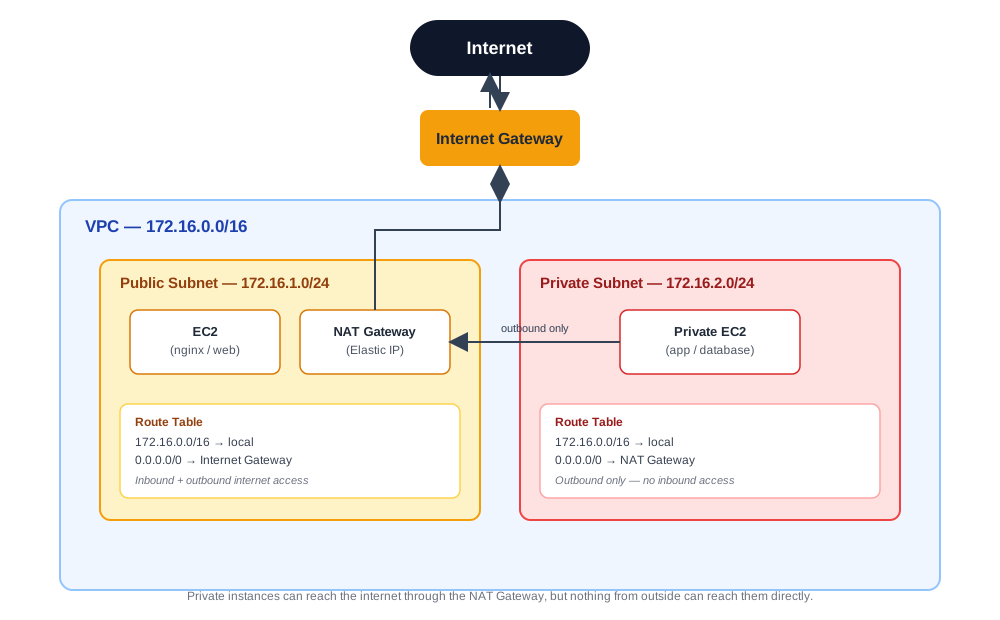
A Virtual Private Cloud (VPC) is your own private, isolated network inside AWS. Think of it less like a "cloud service" and more like a plot of land you've been handed — you define the address range, and you decide exactly how to lay everything out on top of it.
A few things are true of every VPC by default:
- You define your own CIDR block — for example,
172.16.0.0/16, which gives you roughly 65,000 usable IP addresses to divide up however you like. - It's completely sealed off by default. Nothing gets in, and nothing gets out, until you explicitly attach a gateway and configure routing to use it.
- VPCs are regional, but subnets are zonal. A single VPC can span multiple Availability Zones, but each individual subnet you create lives inside exactly one AZ.
That last point matters more than it sounds — it's the reason production architectures spread subnets across multiple AZs for redundancy, rather than putting everything in one.
Subnets: Zones of Trust, Not Just IP Ranges
Subnets carve your VPC's address space into smaller chunks — and each chunk typically represents a different level of trust, not just a different IP range.
Public Subnet (e.g. 172.16.1.0/24) Holds internet-facing resources. Anything here can have a public IP address and be reached directly from the internet, provided its security group allows it.
Private Subnet (e.g. 172.16.2.0/24) Holds your sensitive resources — databases, internal services, anything that shouldn't be directly exposed. Nothing here has a public IP, and nothing here can be reached directly from outside. It can initiate outbound connections (say, to pull a software update), but only through a NAT Gateway.
Here's the detail that trips people up: a subnet isn't "public" or "private" because of what you named it. It's public or private because of what its route table says. You could label a subnet "private" and still leave it fully internet-facing if its route table happens to point 0.0.0.0/0 at an Internet Gateway. The label is just documentation — the route table is the actual enforcement mechanism.
Which brings us to the real heart of the system.
Route Tables: The Heart of AWS Networking
Every subnet is associated with exactly one route table. This table is a simple list of rules: for a given destination, where should traffic go?
There are three route types worth knowing cold:
#RouteDestination → TargetWhat it does
1
Local Route
172.16.0.0/16 → local
Automatic and mandatory — you can't delete it. Lets everything inside the VPC talk to everything else inside the VPC.
2
Public Route
0.0.0.0/0 → Internet Gateway
Full internet access, both directions. This is what makes a subnet "public" in practice.
3
Private Route
0.0.0.0/0 → NAT Gateway
Outbound-only internet access. Instances can reach out, but nothing from outside can reach in.
One rule governs how AWS picks between routes when more than one could match a destination: longest prefix match wins. AWS always evaluates every route in the table and picks whichever one has the most specific (longest) subnet mask. This is the same logic that lets you have a broad default route and a narrower, more specific override for a particular destination, without conflict.
Internet Gateway (IGW): The Front Door
An Internet Gateway is what actually connects your VPC to the internet at all. Without one attached, your VPC is completely invisible from the outside — no route table configuration can substitute for it.
A few properties worth knowing:
- Bidirectional — it handles both inbound and outbound traffic, which is what makes true public-facing resources possible.
- Fully managed — AWS handles all the scaling and maintenance. You attach it to your VPC, and that's the entire operational burden.
- One per VPC — each VPC gets exactly one IGW, and that single gateway serves every public subnet inside it.
NAT Gateway: Outbound Only, By Design
A NAT Gateway solves a specific, common problem: your private instances need to reach the internet (to pull updates, call external APIs, etc.), but you never want the internet to be able to initiate a connection back to them.
Here's the actual sequence when a private instance makes an outbound request:
- Private EC2 initiates the outbound request.
- NAT Gateway (which lives in the public subnet and holds an Elastic IP) translates the private instance's address to its own public IP.
- The internet sees only the NAT Gateway's public IP — never the private instance's real address — and responds to it.
- NAT Gateway forwards that response back to the correct private instance.
The internet never learns your private IP addresses exist. That asymmetry — outbound allowed, inbound blocked — is the entire point of the NAT Gateway.
Getting Admin Access to a Private Instance
If private instances can't be reached directly, how do you actually SSH in to manage one? A few approaches, from classic to modern:
Bastion Host / Jump Box — a small, hardened EC2 instance sitting in the public subnet, acting as the only entry point for administrative access. The flow: your laptop connects to the bastion's public IP over SSH, the bastion checks that your IP is on its approved list (via security groups), and only then do you hop from the bastion to the private instance's internal IP. The bastion's security group should always be locked down to specific trusted IPs — never left open to the world.
Bastion hosts work, but they're not the only option anymore. Depending on what you need:
- AWS Systems Manager Session Manager — the most modern approach. No SSH keys, no open port 22, no bastion host to maintain at all. Sessions run through the browser, authenticated via IAM roles.
- EC2 Instance Connect — browser-based SSH straight from the AWS Console, with temporary keys managed automatically.
- AWS VPN — an encrypted tunnel connecting your laptop or office network into the VPC, effectively treating it as an extension of your private network.
- AWS Direct Connect — a physical, dedicated network connection from your premises to AWS. Enterprise-grade, predictable performance, and it never touches the public internet.
- RDP (port 3389) — for Windows instances, following the same security principles: accessed via bastion or Session Manager, never opened directly to the world.
Tracing the Full Picture
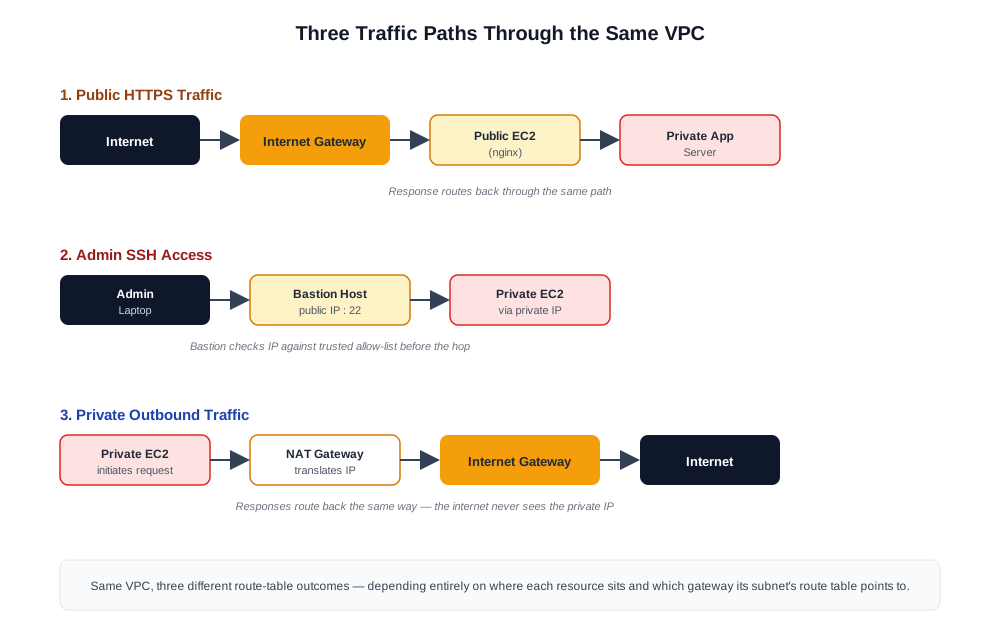
Putting it all together, here's what three common types of traffic actually look like end-to-end:
Public HTTPS traffic: Internet → Internet Gateway → Public Subnet EC2 (e.g. nginx) → Private App Server → response routes back the same path
Admin SSH access: Admin laptop → Bastion's public IP (port 22) → SSH hop → Private EC2's private IP
Private outbound traffic: Private EC2 → NAT Gateway → Internet Gateway → Internet (response routed back through NAT)
Once you can trace these three paths from memory, most "why can't I reach this instance" debugging sessions become a lot faster — you're just checking, in order: is there a route to where I'm trying to go, is there a gateway that route points to, and is a security group or NACL blocking it anyway.
The Takeaway
Every AWS networking question — can this be reached, can it reach out, is this actually secure — comes down to the same three-part check: what subnet is this in, what does its route table actually say, and what gateway (if any) does that route point to. Everything else — bastions, NAT, VPNs, Session Manager — exists to solve specific problems within that same basic framework.
Get comfortable tracing those three things, and AWS networking stops feeling like a black box.